
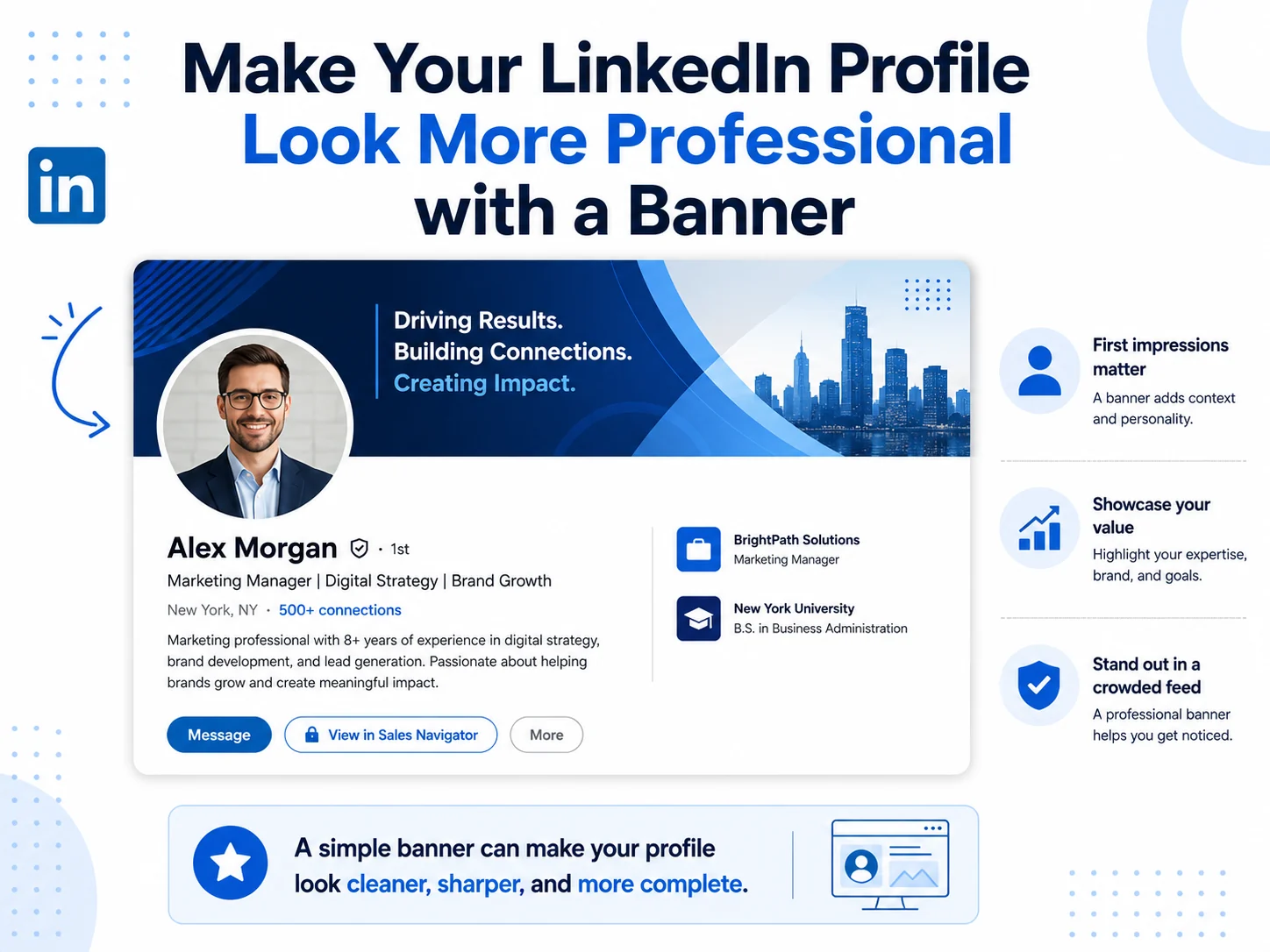
Your LinkedIn profile is often one of the first places people check when they want to know more about you.
It could be a recruiter, client, business owner, hiring manager, coworker, or someone who just saw your comment on a post. Before they message you or connect with you, they may quickly scan your profile.
This is where your LinkedIn banner can help.
A banner will not do all the work for you, but it can make your profile look more complete, clean, and professional. Without a banner, the top of your profile can feel empty. With the right banner, your profile can instantly feel more polished.
The good thing is that you do not need to be a designer to choose a good LinkedIn banner. You just need to pick an image that fits your profile, looks clear, and does not distract people from your name, headline, and profile photo.
In this guide, we will go through simple ways to make your LinkedIn profile look more professional with a banner.
Why Your LinkedIn Banner Matters
Your LinkedIn banner is the wide image at the top of your profile. It sits behind your profile photo and takes up a lot of space in the first view of your profile.
That top section matters because people usually form a quick impression before they read your full profile.
A good banner can make your profile look active, serious, and well put together. It can also give people a small hint about your work or personality.
For example, a clean business banner can make a consultant’s profile look more professional. A building banner can work well for real estate, construction, architecture, or corporate profiles. A technology-style banner can make sense for developers, SaaS professionals, IT consultants, and digital marketers.
The banner does not need to explain your full story. It just needs to support the rest of your profile.
What a Professional LinkedIn Banner Should Look Like
A professional LinkedIn banner should be simple, clean, and easy to understand.
It should not look too busy. It should not have too many colors. It should not use tiny text that becomes hard to read on mobile. It should also not hide important details behind your profile photo.
The best banners usually have one clear style.
They may show a modern office, a soft abstract background, a city view, a clean technology design, a calm nature image, or a polished building background.
A professional banner should feel like it belongs on your profile. It should match the type of work you do or the image you want to show.
If someone visits your profile and thinks, “This person looks professional,” your banner has done its job.
Use the Right LinkedIn Banner Size
Before choosing a design, make sure your banner uses the right size.
For a personal LinkedIn profile, the recommended banner size is:
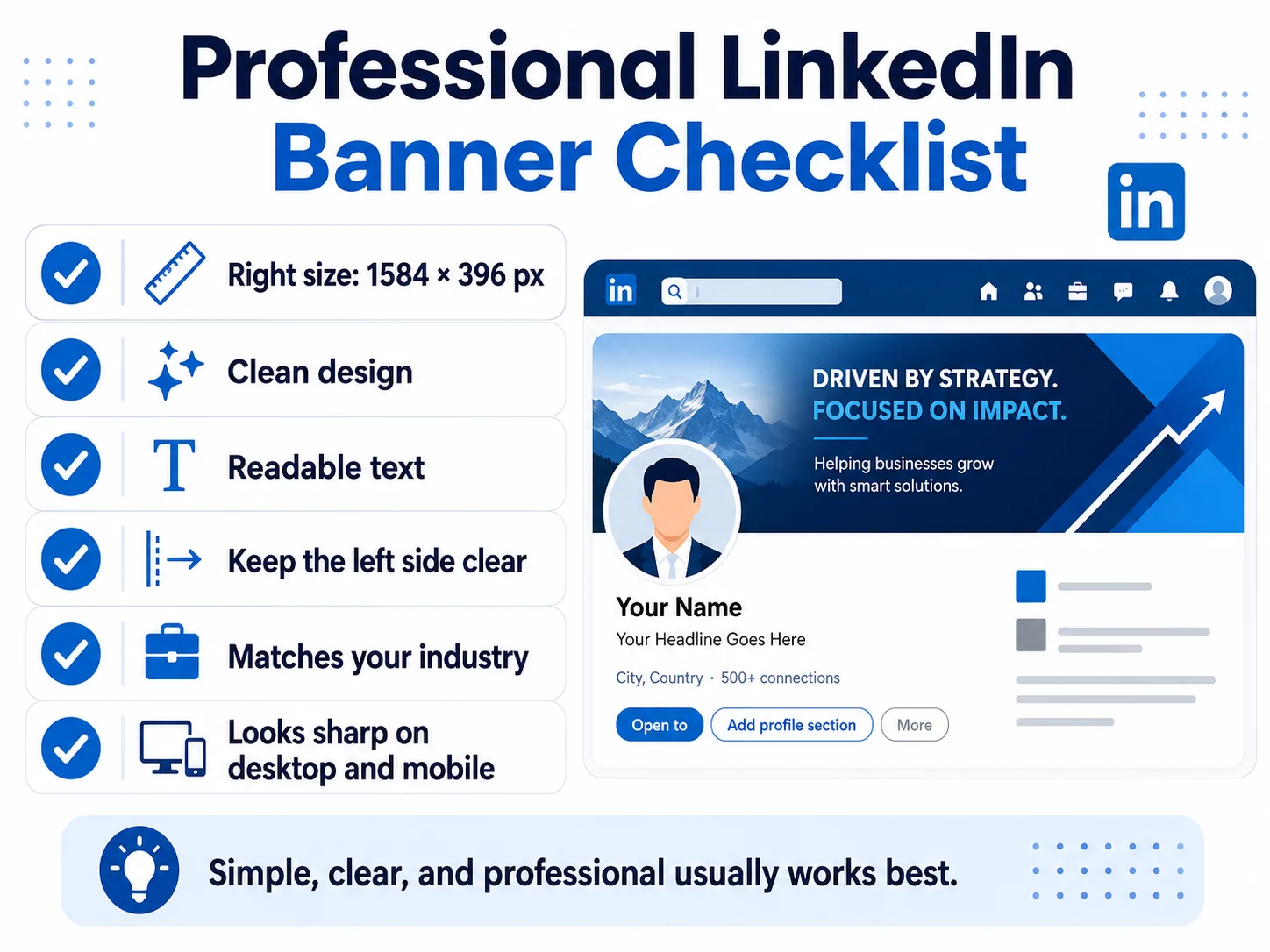
1584 × 396 pixels
This is a wide horizontal size. If you upload a normal square photo or a vertical image, LinkedIn may crop it badly. The image may also look stretched or blurry.
The best file types are JPG and PNG, and the file should be under 8MB.
If you want more details about dimensions, safe area, and file type, you can read our full LinkedIn Banner Size Guide.
Keep the Left Side Clean
One of the biggest mistakes people make is putting important text or design details on the left side of the banner.
Your profile photo overlaps the left side of your LinkedIn banner. This means anything placed there can get covered.
If you add your job title, website, logo, or short message, place it more toward the center or right side. The left side should stay simple.
You can still use color, pattern, or background design on the left. Just avoid placing anything important there.
This is especially important because your banner may appear slightly different on desktop and mobile. A simple layout is safer.
Match the Banner with Your Industry
Your banner should make sense for your work.
You do not need to be too literal, but the image should not feel random.
If you are in business, consulting, finance, or management, a clean corporate banner can work well. Think office buildings, dark blue backgrounds, glass architecture, simple lines, or professional abstract designs.
If you are in technology, choose something modern. Digital patterns, code-style designs, AI-inspired visuals, network lines, or clean blue tech backgrounds can fit well.
If you are in real estate, architecture, construction, or property, building banners are a good option. They quickly show the kind of space you work in.
If you are a designer, marketer, content creator, or creative professional, abstract or graphic banners can help your profile feel more creative without looking messy.
If you are a student or job seeker, keep it simple. A clean professional background is usually better than a loud or overly personal image.
If you are a coach, consultant, or freelancer, choose a banner that feels trustworthy and clear. Soft gradients, simple professional backgrounds, or minimal designs can work nicely.
Choose Colors That Look Professional
Colors can change how your profile feels.
Blue, navy, white, grey, black, and soft neutral colors usually look professional on LinkedIn. These colors are safe because they do not feel too loud.
Bright colors can work too, but they should be used carefully. A little color can make your profile stand out. Too much color can make it look distracting.
You should also think about your profile photo. If your profile photo has a dark background, a dark banner may blend too much. If your photo is very bright, a softer banner may balance it better.
The banner and profile photo should look like they belong together.
They do not have to match perfectly, but they should not fight with each other.
Avoid Too Much Text
Text can be useful on a LinkedIn banner, but only if it is short and clear.
A banner is not the place to write your full bio. People can read your headline, About section, and experience for that.
If you add text, keep it simple.
Good examples:
- Digital Marketing Consultant
- Helping Brands Grow Online
- Software Developer
- Real Estate Advisor
- Business Consultant
- Project Manager
Try to avoid long quotes, full paragraphs, too many services, or small text. On mobile, small text often becomes hard to read.
For many profiles, a textless banner is better. A clean visual can look more premium and less crowded.
Make Sure the Banner Supports Your Headline
Your LinkedIn headline is one of the most important parts of your profile. Your banner should support it, not repeat it word for word.
For example, if your headline says you are a real estate consultant, your banner can show a modern building or city background. You do not need to write “real estate consultant” again on the banner unless you really want to.
If your headline says you work in software development, a technology-style background can support that message.
If your headline says you help businesses with marketing, a clean business or creative banner can fit well.
The banner should make the profile feel connected.
Use a Banner That Fits Your Goal
Different people use LinkedIn for different reasons.
Some people want a job. Some want clients. Some want to build a personal brand. Some want to look more professional because they network often. Some simply want their profile to feel updated.
Your banner should match your goal.
If you are looking for a job, choose a banner that looks clean and professional. Avoid anything too personal or confusing.
If you want clients, choose a banner that makes you look trustworthy. Business, technology, building, or clean graphic banners can work well.
If you are building a personal brand, you may want something more unique. A modern abstract or quote banner can help, but keep it clean.
If you are a business owner, choose a banner that reflects your industry and makes your profile feel credible.
If you are a student, choose something simple and fresh. You do not need to overdo it.
Professional Banner Ideas for Different Profiles
Here are some simple banner ideas based on different profile types.
For job seekers, use a clean background with soft colors, simple shapes, or a professional workspace style. The goal is to look serious and ready for work.
For business professionals, use corporate buildings, office-style designs, dark blue backgrounds, or clean abstract patterns.
For software developers and IT professionals, use technology backgrounds, digital lines, coding-inspired visuals, or simple modern graphics.
For real estate professionals, use building exteriors, city views, modern property images, or clean architecture backgrounds.
For finance professionals, use dark blue, silver, gold, clean office designs, or simple data-style graphics.
For marketers and creators, use abstract graphics, soft gradients, creative shapes, or modern visual designs.
For coaches and consultants, use calm, clean, and confident banners. Avoid anything that looks too loud.
For executives and founders, use premium, simple, and polished banners. Dark backgrounds, clean lines, and professional buildings can work well.
Common Banner Mistakes to Avoid
A LinkedIn banner can help your profile, but a poor banner can make the profile look less professional.
Here are common mistakes to avoid:
- Using a blurry image.
- Using an image that is too small.
- Using a random photo that does not fit your work.
- Adding too much text.
- Using tiny text that people cannot read.
- Putting important text behind the profile photo.
- Using colors that look too loud.
- Using a very busy background.
- Uploading a company page cover image to a personal profile.
- Using a banner that looks like an ad instead of a profile background.
The best banner is usually the one that looks clean, clear, and natural.
Before and After: Why a Banner Changes the Feel of a Profile
Think about two profiles.
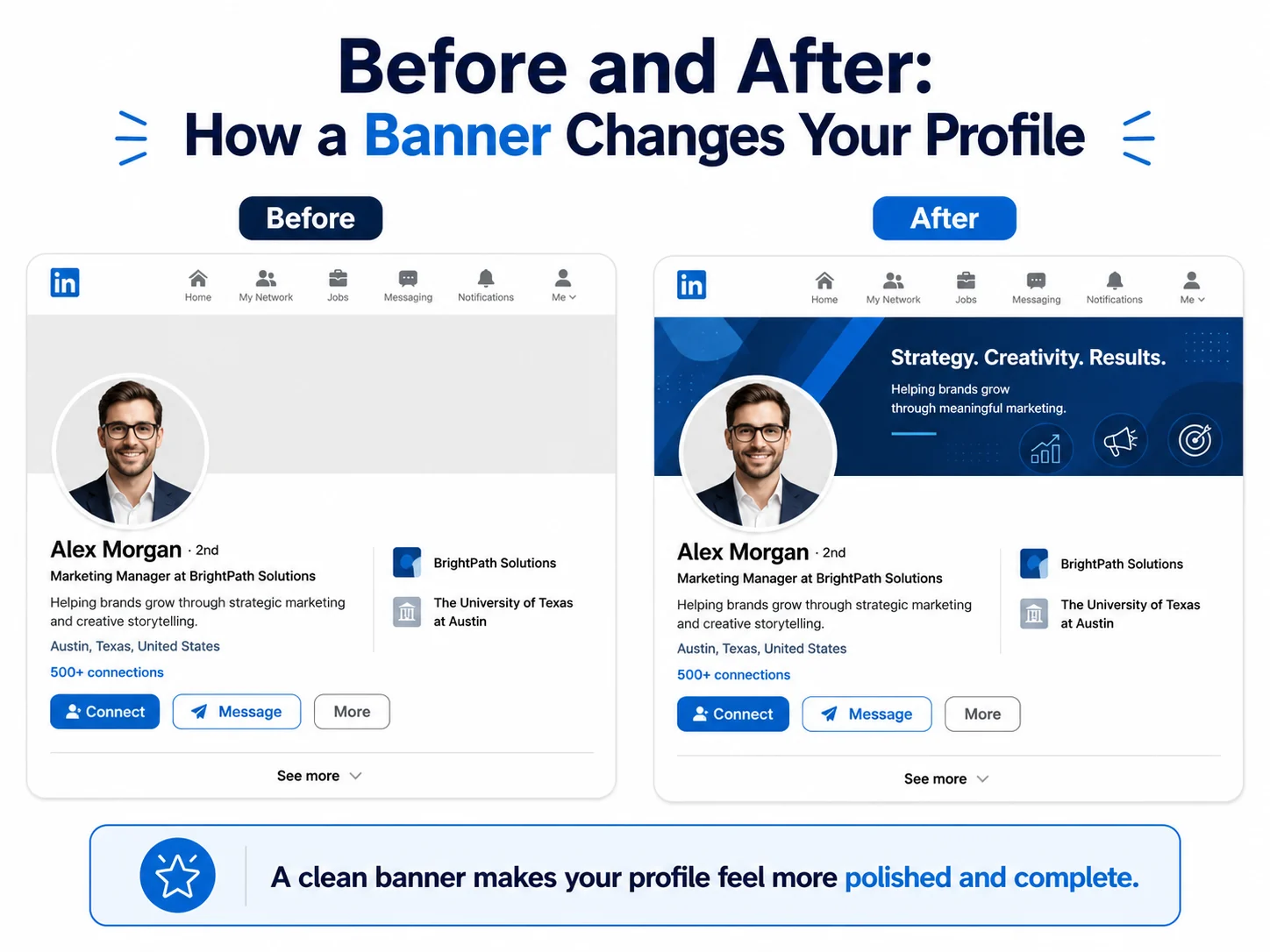
The first profile has no banner. It has a plain empty background behind the profile photo. The profile may still be good, but the top area looks unfinished.
The second profile has a clean professional banner. The banner matches the person’s industry, the colors are simple, and the profile photo is clear.
The second profile will usually feel more complete.
This does not mean the banner alone will get you a job or client. But it can improve the first impression. And on LinkedIn, first impressions matter.
Where to Download Free Professional LinkedIn Banners
You do not have to design a banner from zero.
Browse the main banner categories: choose Abstract LinkedIn banners for a modern style, Graphic LinkedIn banners for a creative profile, Business LinkedIn banners for a corporate look, Technology LinkedIn banners for tech and digital profiles, Nature LinkedIn banners for a calm profile, Urban LinkedIn banners for city-based professionals, and Quote LinkedIn banners if you want a message-based background.
On LinkedIn Background Banner, you can download free LinkedIn banners for different profile styles and industries.
You can choose from abstract banners, graphic banners, business banners, building banners, technology banners, nature banners, quote banners, urban banners, and cool modern banners.
Some good starting points are:
- Free abstract and graphic LinkedIn banners
- Professional building LinkedIn banners
- Cool LinkedIn banners for modern profiles
Choose the banner that fits your profile best, download it, and upload it to LinkedIn.
If you are not sure what to choose, start with a simple professional banner. You can always change it later.
How to Upload Your LinkedIn Banner
Once you have chosen your banner, uploading it is easy.
Go to your LinkedIn profile. Click the camera or edit icon on the banner area. Upload your new image. Adjust the position if needed. Save the changes. Then check your profile on desktop and mobile.
After uploading, look at the profile as a visitor would. Make sure your profile photo does not cover anything important and the banner looks sharp.
Quick Checklist for a Professional LinkedIn Banner
Before you use a banner, ask yourself these questions:
- Does it fit my work or profile goal?
- Is it clean and easy to understand?
- Is it the right size?
- Does it look sharp?
- Is the left side clean enough for the profile photo?
- Is the text readable, if there is any?
- Does it match my profile photo?
- Would it make a good first impression?
If the answer is yes, the banner is probably a good choice.
FAQ About Professional LinkedIn Banners
Here are simple answers to common questions about choosing a clean and professional LinkedIn banner.
Does a LinkedIn banner really matter?
Yes, it can help your profile look more complete and professional. It is not the most important part of your profile, but it can improve the first impression.
What type of LinkedIn banner looks most professional?
Clean, simple banners usually look the most professional. Business backgrounds, abstract designs, buildings, technology visuals, and soft minimal backgrounds can all work well.
Should I use a photo or a graphic banner?
Both can work. A photo can feel natural and realistic. A graphic banner can look cleaner and more modern. Choose the one that fits your profile better.
Should my LinkedIn banner have my job title?
It can, but it does not have to. If your headline already explains what you do, a textless banner may look cleaner.
What is the best size for a LinkedIn banner?
For a personal profile, the recommended size is 1584 × 396 pixels.
Can I use a free LinkedIn banner?
Yes, you can use a free banner as long as it is high quality, the right size, and suitable for professional use.
How often should I change my LinkedIn banner?
You do not need to change it often. Update it when your role, brand, industry focus, or profile goal changes.
Final Thoughts
A LinkedIn banner is a simple way to make your profile look more professional.
It gives the top of your profile a cleaner and more complete look. It can also help people quickly understand your style, industry, or personal brand.
The best banner is not always the flashiest one. Most of the time, a clean and simple banner works better. Choose something that fits your work, uses the right size, avoids clutter, and keeps important details away from the profile photo area.
Whether you choose a business banner, abstract design, building background, technology image, nature banner, or modern graphic style, make sure it supports the image you want to show.
If you want a quick option, browse our free LinkedIn background banners and download one that fits your profile.